Adobe Lightroom: The Ultimate Tool for Photographers
In the world of photography, editing has become an essential part of the creative process. Adobe Lightroom is one of the most popular photo editing tools among professional and amateur photographers. It offers a vast array of features that allow you to enhance your images and make them look stunning.
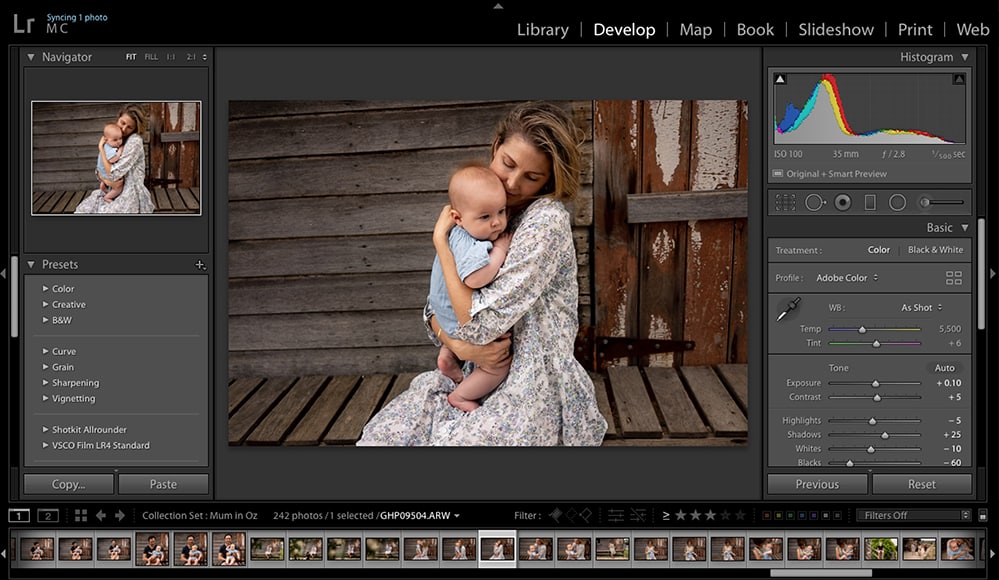
Adobe Lightroom is a powerful photo editing tool that has been around since 2007. It was originally designed to help photographers manage their photo collections, but it has evolved into a full-fledged editing software that offers a wide range of tools and features for editing and enhancing photos.

In this article, we will explore the features and benefits of Adobe Lightroom and how it can help you take your photography to the next level.

What is Adobe Lightroom?
Adobe Lightroom is a photo editing software that allows you to edit and manage your photos. It was created by Adobe Systems and is available as part of the Adobe Creative Cloud Photography Plan.
Features of Adobe Lightroom
- Library Module: The Library Module is where you manage your photos. You can import, organize, and tag your photos in this module. You can also create collections and Smart Collections to organize your photos based on different criteria.
- Develop Module: The Develop Module is where you edit your photos. You can adjust exposure, contrast, highlights, shadows, and more. You can also make local adjustments using the Adjustment Brush or the Graduated Filter.
- Export Module: The Export Module is where you export your edited photos. You can choose the file format, resolution, and quality of your exported photos. You can also add watermarks or resize your photos.
- Presets: Lightroom Presets are pre-made edits that you can apply to your photos. There are hundreds of presets available online, and you can also create your own.
- Mobile App: Adobe Lightroom also has a mobile app that allows you to edit your photos on the go. You can sync your photos and edits between your desktop and mobile devices.
Benefits of Adobe Lightroom
- Non-destructive Editing: Lightroom uses non-destructive editing, which means that your original photo is not altered when you make edits. Your edits are saved as metadata and can be removed or adjusted at any time.
- Integration with Photoshop: Lightroom integrates seamlessly with Photoshop. You can edit your photos in Lightroom and then send them to Photoshop for more advanced editing.
- Organizational Tools: Lightroom has powerful organizational tools that make it easy to manage your photo collection. You can tag your photos, create collections, and use filters to find specific photos quickly.
- User-friendly Interface: Lightroom has a user-friendly interface that makes it easy to navigate and use. The layout is intuitive, and the tools are easy to understand.
How to Get Started with Adobe Lightroom
- Choose a Plan: You can choose between a Photography Plan or a Creative Cloud Plan. The Photography Plan includes Lightroom and Photoshop, while the Creative Cloud Plan includes all Adobe apps.
- Download Lightroom: Once you have chosen a plan, you can download Lightroom from the Adobe website.
- Import Your Photos: You can import your photos by clicking on the Import button in the Library Module. You can choose to import your photos from your computer or camera.
- Start Editing: Once your photos are imported, you can start editing them in the Develop Module. You can adjust exposure, contrast, and other settings to make your photos look great.
- Conclusion: Adobe Lightroom is a powerful photo editing tool that offers a wide range of features and benefits. It is user-friendly, non-destructive, and integrates seamlessly with Photoshop. If you